
Affected journalists
- A Status: means that the journalist has answered that he/she will write an article on the press file. Now you have to change the status from W to A.
How to proceed:
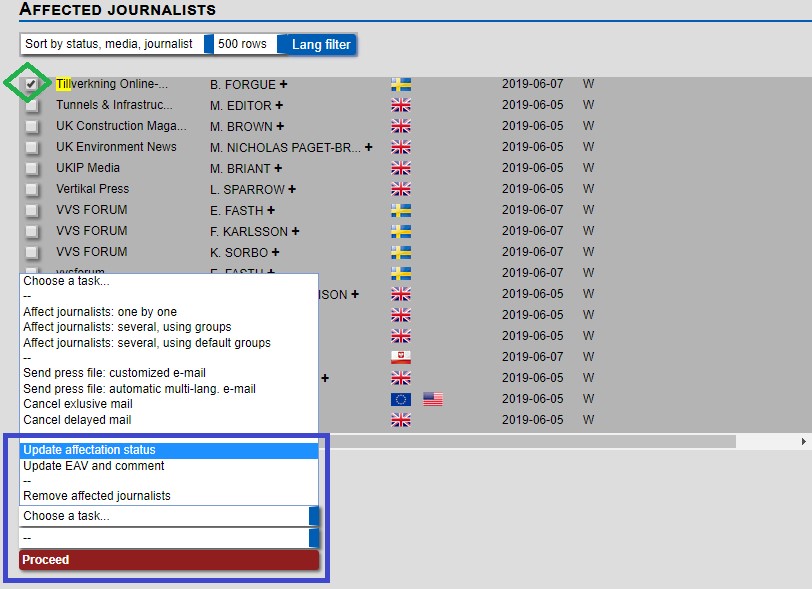
Go to affected journalist of the corresponding press release, select your media/journalist by clicking on the check box as shown above in green, and under choose a task select Update affectation status and choose A, then click on Proceed as displayed below.
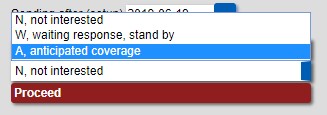
- N Status: means that the journalist is not interested in publishing your press release and/or they selected not interested in error in their private access when they received the PR. In the case that a journalist has done this you can change their status to W or A by following the same process detailed above.
- Affected Journalists detail
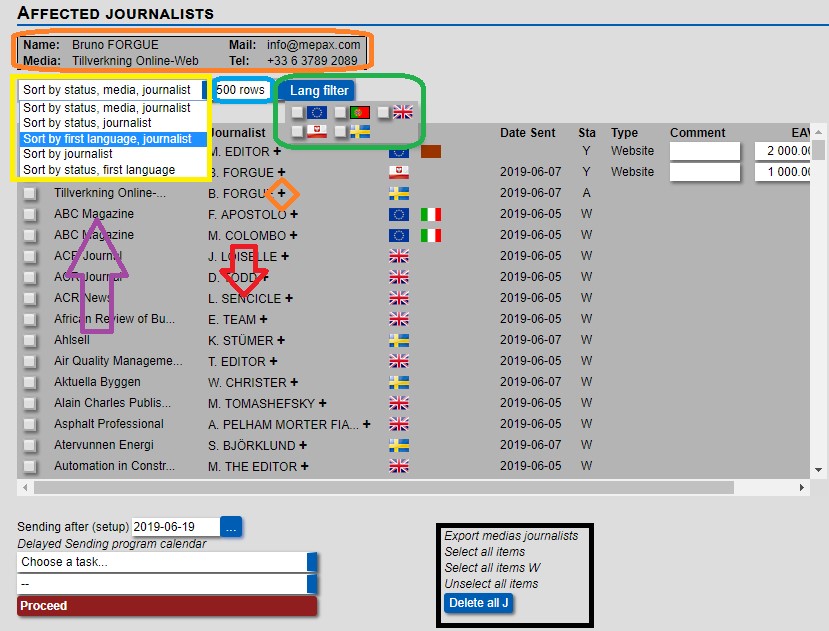
- Information in orange: Journalist information will appear if you click on the plus sign.
- Yellow drop-down box: Here you can sort by status journalist etc..
- Blue: You can choose how many rows you can by page with a maximum of 500 rows.
- Green: You can filter by language.
- Purple arrow: by clicking in the media name you access the media profile.
- Red arrow: by clicking on the journalist name you access the journalist profile.
- Black: Click on the function as required.