
Customer Communication contact creation
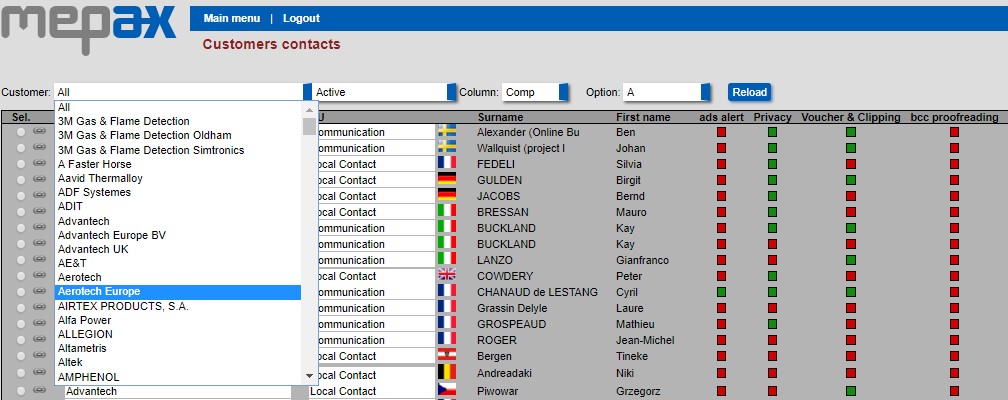
Go to Main Menu under the administration tasks select Customers (contacts). Select your new customer by scrolling in the drop-down box as shown below in blue and click on reload.
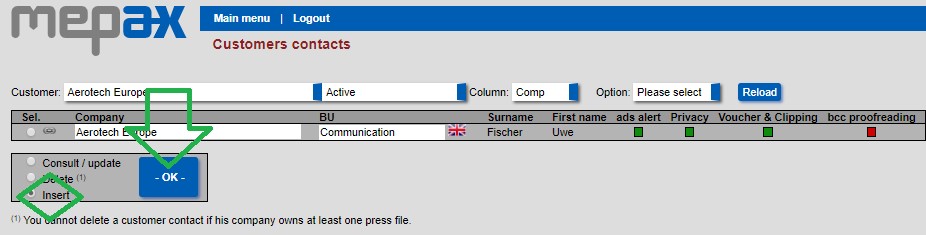
To add the required information, at the bottom of the page, click on insert then ok as displayed below in green:
Now you directly access the customers contacts form:
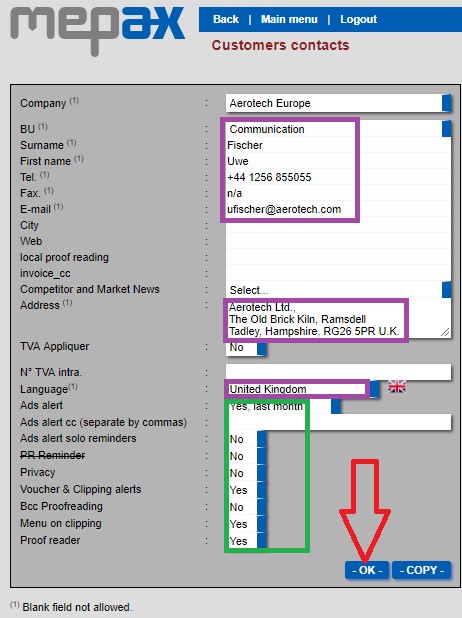
Complete the information fields highlighted above in purple.
Then complete the additional information highlighted in green:
- Ads alert: this is relevant when you have created a media plan (Advertising campaign). If you select yes, your customer will receive a reminder email each Monday asking them to provide missing ad material.
- Ads alert cc: in this field you have the possibility to add another contact email.
- Privacy: if you select Privacy YES, when you create a press release the customer communication contact will not appear at the bottom of your PDF. In contrast, if you select Privacy NO, the contact will appear at the bottom of the PDF press release.
- Vouchers & Clipping alerts: if you select YES, your customer will receive notification email when you upload a clipping (article published) or a voucher associated with a media plan.
- Bcc Proofreading: if your customer communication contact asks you to send a translation received for proofreading you can select yes, and your communication contact will receive copies of all the automatics proofreading/reminders emails sent to the local contacts. This allows the clients to follow/keep track of the proofreading status. It is not essential but if the client wants to, then we can offer this insight into the workflow.
- Menu on clipping: if you select YES, you allowed your customers to consult the uploaded clippings through their client private access.
- Proofreader: if your client requires proofreading you must select yes. If do not select YES at this point the proofreading contact does not appear in the proofreading page. (for more information please see the proofreading section )
At this point you may need to create additional BU Business Unit for your client like local contacts for different countries and for a specific invoice contact. If your new client needs to distribute a PR in various countries, we need a local contact per country.