Pre-Invoicing
There are 4 different ways to invoice our customers.
- Automated invoices: they are automatically generated by the database. Laura checks and sends them to the customer, each month.
- Media Plan invoices: they are listed under the “Media plan invoices module”
- Customized invoices: they are manually created by Laura with the info that each Project Manager sends to her. Laura Mutto l.mutto@mepax.com
- Pre-invoices: they are edited by the Project Manager in the press files. They will be listed with all the “PR activity invoices”. Laura checks that everything fits (invoice contact, figures, mistakes and so on) and finally sends them to the customers. To do this last point, follow this simple process.
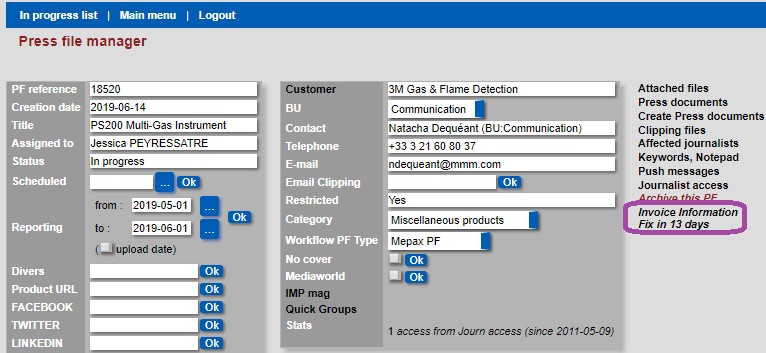
- Open the press file that you want to pre-invoice for.
- In the press file manager click on the link Invoice Information fix in xx days as shown below in purple.
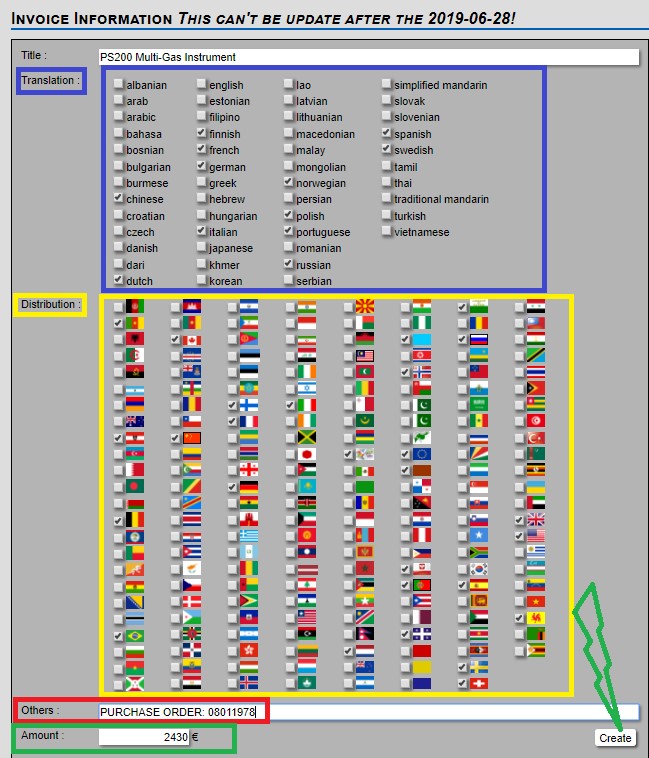
- Next under translation select all the languages versions you are pre-invoicing for, as displayed below in blue.
- Now select the distribution countries as shown below in yellow.
- In others field, you can put the purchase order number if you have one or any other comments help Laura the person responsible for the final invoice as displayed below in red.
- Finally, in the last field add the global amount and click on create as shown below in green. Please note that you can update the pre-invoice until the day of invoicing.